YOUR DRIVE, EXPLAINED
Turbo Football: the complete guide
Turbo Football makes the ball, rather than a finish line, the centre of a driving game. Use a car to push and strike a physical football past a goalkeeper that moves across the goal. Score three times within two minutes. Each new ball starts from a different lateral position, so accurate approach angles and restrained boost matter more than simply driving straight at maximum speed.
| At a glance | Game details |
|---|---|
| Objective | Drive the ball past a moving goalkeeper and score three goals. |
| Distinct mechanic | Ball control + angles |
| Session limit | 120 seconds |
| Control style | football |
Controls & how to play
| Input | Action |
|---|---|
| W / ↑ | Accelerate |
| S / ↓ | Brake; keep holding to reverse |
| A / D | Steer |
| Space | Use regenerating boost |
| R / Recovery | Reset to the recovery point without spending a life or adding a time penalty |
| C / Ball reset | Reset the ball; spend five seconds |
| P / Pause | Pause or resume the active session |
Choose Low, Medium or High in the player. Low starts with calmer settings; High uses the base challenge described below. Changing difficulty starts a fresh run. Start and focus the canvas for keyboard controls; touch actions appear beneath it. You have three lives. A detected failure offers Continue, and Reset vehicle restores a safe position.
A hat-trick is the actual objective
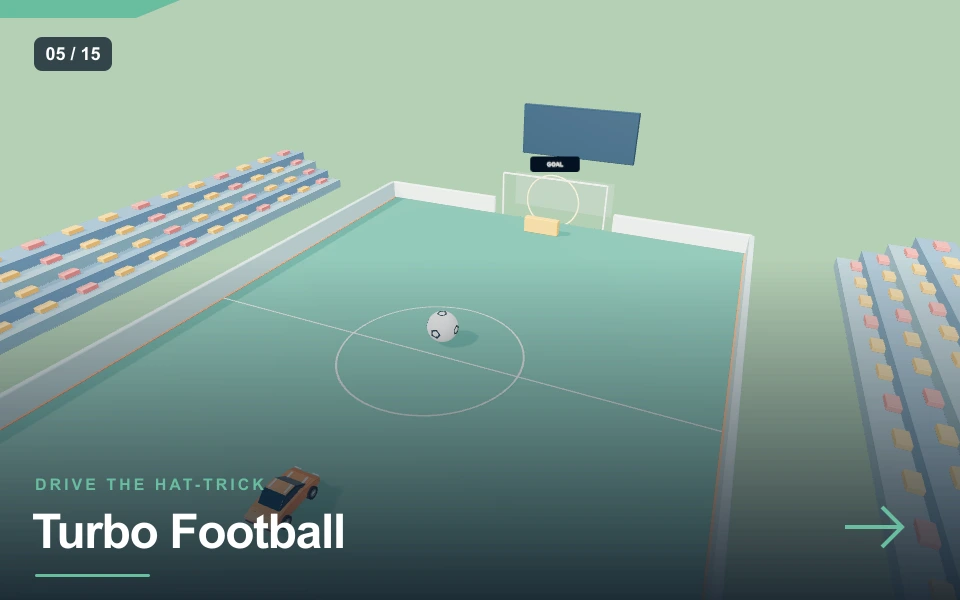
The pitch contains a physical ball, perimeter walls, a goal opening and a moving keeper near that opening. The opening ball starts ahead of the car near the middle of the field. Drive into it to transfer momentum, then follow the result and set up another contact if necessary. The goal counter rises when the ball crosses the scoring line inside the goal width and below the top opening.
Three goals complete the mission. There is no opponent team, player switching or full football match running behind this challenge. The 120-second clock is shared by all three attempts at scoring. After a goal, the car returns to its starting position and the ball resets with a sideways offset. The next goal therefore needs a new approach. Hitting the keeper or driving the car through the goal without the ball does not score.
Approach the ball from the direction you want it to travel
A football responds to the contact it receives, not to where the car’s camera is looking. To send it toward the goal, put your car behind it relative to that goal and approach with a controlled heading. A sideways collision creates sideways movement, which can be useful for changing the shooting angle but can also send the ball toward a wall.
Use a light initial push to see the response. After that, reposition before committing to another strike. Chasing at full throttle often brings the car alongside the ball instead of behind it. Brake, turn and choose a fresh contact line. The large ball is deliberately easier to see than a realistically scaled football, but it remains a separate body with bounce and rotation. It is not attached to the bumper, carried by an invisible possession state or automatically aimed toward the goal.
Beat a keeper that reacts to the ball
The goalkeeper slides sideways near the goal mouth and tracks the ball’s lateral position within its movement range. A straight central push therefore gives it a simple blocking opportunity. Look for an angle that sends the ball toward an open side, or move the ball laterally before striking toward the opening.
The keeper cannot cover the entire field and is limited around the central part of the mouth. That makes accurate side placement more useful than hoping an identical central contact will work on every retry. Avoid assuming that a keeper at one side will stay there while the ball travels. Its position can change during the approach. The visible opening is the best reference: the ball must cross within it and below its height limit. A high bounce over the crossbar area does not satisfy the scoring check.
Boost should finish a setup rather than replace one
Space uses a regenerating boost reserve. It makes the car accelerate more strongly while draining the visible BOOST meter. The reserve recovers after release. A short burst can give a well-lined-up ball enough momentum to pass the keeper, but the same burst can magnify a poor contact angle.
Prepare your heading with ordinary throttle and steering, then use boost when the bumper is approaching the ball on a useful line. Release once the strike is made so you can brake and follow the ball. Keep an eye on where your own car will end up: travelling beyond the ball or into the goalkeeper can leave you facing the wrong way. Boost does not change the size of the goal, grant automatic possession or make the ball ignore collisions. It changes your approach movement, and the ball then follows the contact physics.
Resets help, but they spend the shared clock
If the ball leaves the playable area far enough or falls away, the game puts it back near the centre. You can also press C to reset a troublesome ball manually, at a cost of five seconds. That is useful when the car has pushed it into an awkward location, but repeated resets can leave insufficient time for the remaining goals.
R or Reset vehicle returns the car to its starting position without a life or time penalty; it is a separate action from the ball reset. Touch players can use a full restart if they want a clean new opening, although that also clears current goals. After scoring, use the changed ball position as a cue to reconsider the line. The first goal’s successful central or angled approach is not automatically the best answer to the second. Keep the goal counter and clock visible while you decide whether to recover or continue.
Momentum, walls and honest simulation limits
OpenStax’s collision material provides background for why impact direction and momentum matter. In the game, a heavy car meets a lighter ball, and body contact transfers motion. The perimeter walls can redirect a missed shot, giving you another chance to reposition. An intentional wall rebound can be interesting, but there is no guaranteed scripted bank-shot path.
This is an original small car-football challenge with stylised grandstands. It does not contain licensed teams, stadium names, ranked matchmaking or the advanced aerial manoeuvres of a commercial competitive car-soccer game. There is no jump control in this mode. The goalkeeper’s movement is a programmed response rather than human strategy. Those limits make the challenge easy to understand without removing its core decisions: where to meet the ball, how hard to strike it and how to get around a moving blocker.
Practise ball contact before timing the hat-trick
Spend an opening attempt nudging the ball without boost. Try one central contact and one sideways contact, then compare where the ball travels. On the next run, aim for a side of the goal and reserve boost for the final approach. If the keeper blocks, inspect the ball’s line instead of adding more throttle automatically.
Once you can score once, practise the offset second ball. Give yourself room to get behind it before accelerating. A controlled first goal with plenty of clock left is a better foundation than several rushed contacts near the mouth. Stunt Bowling uses another physical object interaction, but you choose a launch and then watch the pin response. Arena Knockout replaces the ball with cars that actively pursue you. Turbo Football is the option for repeated repositioning around one object and an opening guarded by a moving target.
Graphics, sound and fullscreen settings
The pitch uses field markings, stylised grandstands and a large contrasting football. A different-coloured keeper makes the moving blocker easy to distinguish from the car. Goal-frame visuals describe the opening, while the live ball position and goal counter show what the physical interaction actually achieved.
Sound begins after a player interaction. The shared audio system provides a synthesised engine layer, short action cues and background music. Music can be switched off separately, and volume or mute controls adjust the output. Use fullscreen for a larger view; where native fullscreen is unavailable, the expanded player keeps the scene usable. High HD increases rendering resolution and shadow detail on supported devices. Light reduces those costs on a slower phone without changing the objective. Pause before changing focus; the game also pauses when you leave the tab. Choose the setting that keeps your controls responsive rather than assuming the highest option improves the physics.
Pros & cons
What works well
- The ball is a separate body with genuine pushes, rebounds and collisions.
- The keeper follows the ball and changes the usable shooting angle.
- Offset goal resets make each scoring setup different.
Practical limits
- This is a single-player scoring challenge rather than a full match.
- There is no jumping or aerial possession system.
- Manual ball resets spend five seconds of the mission.
Choose your next challenge
The shared player makes it easy to switch games, but each mission asks for a different decision. Compare the objective rather than expecting one score to mean the same thing across every mode.
| Game | Objective | Session |
|---|---|---|
| Turbo Football | Drive the ball past a moving goalkeeper and score three goals. | 120 sec limit |
| Stunt Bowling | Aim and launch your car to topple ten physical pins in three shots. | 150 sec limit |
| Arena Knockout | Knock five rival cars off the rooftop arena while staying on it yourself. | 120 sec limit |
Frequently asked questions
What counts as a goal?+
The ball must cross the scoring line within the goal width and below the opening height. Driving the car into the goal is insufficient. A high ball over the mouth or a shot outside its sides does not count.
Is the ball attached to the car?+
No. It is a separate physics object. Contact direction and approach speed change its movement, and it can roll away or rebound from walls. Reposition behind it when you want another controlled strike.
How can I reset a trapped ball?+
C resets the ball and spends five seconds on the shared clock. R recovers the car separately without spending a life or adding a time penalty. A complete restart provides a fresh opening while also clearing the current goals.
Can I play a team match or multiplayer?+
This implementation is a solo three-goal challenge with a programmed goalkeeper. It does not offer teams, match halves, network opponents or ranked play. Its focus is vehicle positioning and physical ball contact.
Final words
Turbo Football rewards a measured attempt and a clear understanding of the current mission. Start with Low, practise one section at a time and use the reset control when you need a safe position. Watch what changed between attempts before adding more speed. The useful result is a technique you can repeat, with room to improve on the next run.